




A software update and a firmware flash look almost identical from the outside — click a button, wait, reboot.
The difference is what happens when something goes wrong.
A bad software update is annoying. A bad firmware flash can permanently destroy hardware with no recovery path. That’s not an exaggeration — it’s the technical reality of writing directly to a device’s core memory chip.
Flashing tech is one of the most powerful tools in a technician’s kit and one of the most misunderstood by everyone else. If you’re trying to understand what it actually means, when it’s genuinely necessary, and how professionals approach it without turning hardware into a paperweight — this is the guide to read first.
Table of Contents
Summary
- Flashing tech means rewriting a device’s firmware — the low-level software that controls how hardware behaves.
- It’s more like system surgery than a software update: done wrong, it can permanently disable a device.
- Most flashing failures happen because flashing wasn’t necessary in the first place.
- Legitimate use cases include security patches, bug fixes, and custom ROM installations — not chasing version numbers.
- Always verify firmware sources, back up data, and have a rollback plan before flashing anything.
Flashing tech is one of those terms that sounds more dramatic than most people expect — until something goes wrong.
At its core, flashing tech means rewriting firmware: the foundational software layer that lives on a chip inside your device and tells the hardware how to behave. Flashing tech refers to rewriting firmware — the low-level software stored in non-volatile memory that controls hardware behavior.
That’s not the same as updating an app or even reinstalling an operating system. Firmware sits below all of that, and that’s what makes flashing both powerful and risky.
This guide covers what flashing tech really means, who it’s for, when it makes sense, and how professionals avoid the mistakes that brick devices across industries every day.
What Exactly Is Flashing Tech?

Think of a device as having three layers of software:
- Apps — what you use day to day
- Operating system — manages resources and runs apps
- Firmware — talks directly to the hardware, controls boot behavior, sensors, and core functions
Flashing modifies the third layer. It writes new code directly to the chip’s non-volatile memory — the kind that persists even when the device has no power.
This is why flashing is closer to system surgery than routine maintenance. The device has no fallback if the process is interrupted or the firmware is corrupt.
Common devices where flashing is used include:
- Smartphones (custom ROMs, carrier unlocking, OS downgrades)
- Routers and network equipment (security updates, performance patches)
- IoT devices and embedded systems (bug fixes, new protocol support)
- Automotive ECUs (engine control units for tuning or compliance updates)
- Industrial controllers and medical devices
Who Is Flashing Tech For?
Flashing isn’t for casual users who want a speed boost. It’s a legitimate technical process used by:
IT and security teams managing fleets of IoT devices that need rapid firmware updates after vulnerabilities are disclosed.
Developers and hardware engineers who need to test custom builds, debug firmware behavior, or push prototype software to evaluation devices.
Power users and enthusiasts unlocking features restricted by manufacturers, installing open-source firmware (like OpenWRT on routers), or breathing life into older hardware.
Automotive and industrial technicians applying manufacturer-issued firmware corrections to control units — a common practice in both scheduled maintenance and recall responses.
If you’re a general consumer who received a notification saying “update available,” you’re not flashing your device. You’re running a standard OTA (over-the-air) update, which is a very different, much safer process.
When Does Flashing Tech Actually Make Sense?

The honest answer: less often than most tutorials suggest.
Many “bricks” happen not because flashing failed — but because it never needed to happen.
Here are the cases where flashing has a clear, legitimate payoff:
Security vulnerabilities with no OTA fix available. If a device no longer receives manufacturer updates but has a known exploit, flashing patched community firmware is often the only practical remedy. An IoT gateway running stable firmware but exposed to a known remote-execution flaw is a scenario where flashing reduces systemic risk despite short-term downtime.
Custom functionality that stock firmware doesn’t support. OpenWRT, LineageOS, and similar open-source projects give devices capabilities the manufacturer never intended — better VPN support, extended hardware compatibility, privacy controls.
Downgrading after a bad update. Manufacturers occasionally push OTA updates that introduce bugs or remove features. Flashing an older, stable firmware version is sometimes the only route back.
End-of-life device extension. When manufacturers stop updating a device, community firmware can keep it functional and secure for years longer.
When You Should NOT Flash a Device
This section rarely makes it into firmware tutorials, which is part of the problem.
Don’t flash just to get the latest version. If a device is functioning well and receiving official updates, flashing community or unofficial firmware introduces risk without proportional reward.
Don’t flash if you don’t have a verified source for the firmware. Downloading firmware from unofficial mirrors or forums without checksums is an easy route to malware or a corrupt flash.
Don’t flash under time pressure. Firmware writes can take several minutes. Power loss, an accidental disconnection, or an impatient restart mid-process is one of the most common causes of permanent damage.
Don’t flash devices with safety-critical functions without proper authorization and testing. This includes medical devices, industrial machinery, and vehicle control systems — flashing these in unsanctioned ways can have serious real-world consequences.
Common Mistakes (and How to Avoid Them)
1. Using Unverified Firmware
Always download firmware from the official manufacturer site or a well-known, widely audited community source. Compare checksums (MD5, SHA-256) to confirm the file hasn’t been tampered with or corrupted.
2. Skipping Backup
Flashing typically wipes existing data. Back up settings, configurations, and user data before starting. On routers, export your config file. On phones, use an encrypted backup.
3. No Rollback Plan
Professionals prioritize verification and rollback, not speed. Before flashing, confirm whether the device supports a recovery mode or a fallback partition. Some devices — particularly budget IoT hardware — do not, and a failed flash means the unit is gone.
4. Ignoring Battery Level
On portable devices, never flash below 80% battery. A power interruption mid-write is one of the few unrecoverable failure modes.
5. Using the Wrong Firmware Version
Firmware is often hardware-specific. The same product sold in different regions may have different chips, and a firmware file built for one variant can permanently disable another. Always verify the exact model and hardware revision.
Flashing Tech Across Industries
| Industry | Common Use Case | Key Risk |
| Consumer Electronics | Custom ROMs, carrier unlock | Voided warranty, brick |
| Networking/IT | Security patches, OpenWRT | Config loss, lockout |
| Automotive | ECU tuning, recall fixes | Safety and liability |
| Industrial IoT | Protocol updates, bug fixes | Downtime, device failure |
| Healthcare Devices | Regulatory-approved updates only | Strict compliance required |
Does Flashing Void Your Warranty?
Usually, yes — especially when unofficial tools or third-party firmware are used. Most manufacturers treat unauthorized firmware modifications as grounds to void hardware warranties.
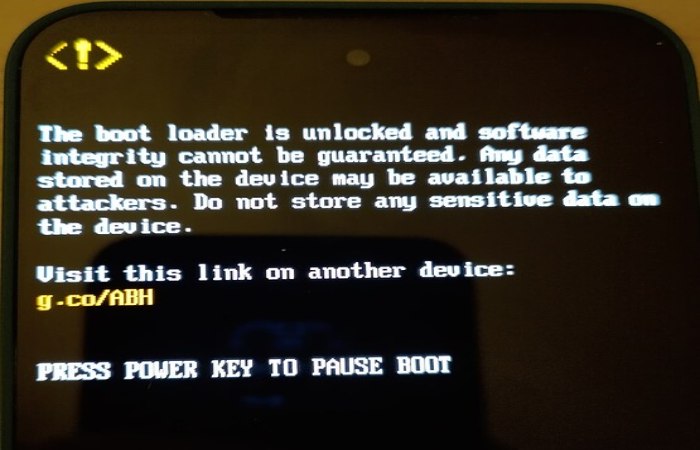
Some Android devices offer official unlocking programs (Google Pixel, for example, has a supported bootloader unlock process). But even then, warranty terms often change.
If a device is still under warranty and functioning normally, flashing for non-critical reasons is rarely worth the coverage you’d give up.
Flashing Tech and Security: The Double-Edged Side
Firmware flashing is a legitimate security tool and a potential attack vector.
On the defensive side, security teams use controlled flashing to patch vulnerabilities quickly across large device fleets — especially in IoT environments where OTA update infrastructure is limited or absent.
On the offensive side, firmware-level malware is particularly dangerous precisely because it operates below the OS. It can survive factory resets, evade antivirus tools, and persist through software reinstalls. Ensuring you only flash signed, verified firmware from trusted sources is the primary defense.
FAQs
What is flashing tech in simple terms? Flashing tech means rewriting the firmware on a device — the core software that controls how hardware operates at its most basic level. It sits below the operating system and cannot be changed through normal software updates.
Is flashing tech safe? It can be safe when justified, planned, and executed with verified firmware and a rollback option. Most risks come from flashing when it isn’t necessary or without proper preparation.
Can flashing permanently damage a device? Yes. Incorrect firmware, mismatched hardware versions, or power loss during the write process can permanently brick a device.
Is flashing the same as a software update? No. Standard software updates modify apps or the OS. Flashing rewrites low-level firmware that controls hardware behavior — it’s a fundamentally deeper and riskier operation.
Does flashing a device void the warranty? In most cases, yes. Unofficial firmware or tools typically void manufacturer warranties. Some manufacturers support official unlock programs, but warranty terms usually change regardless.
How do professionals approach flashing? They flash only when there’s a clear, justified reason — security vulnerability, missing functionality, or end-of-life support. They verify firmware integrity, back up configurations, and always confirm a recovery path exists before starting.
Final Conclusion
Flashing tech is one of the most consequential actions you can take on a device — and one of the most misunderstood.
When it’s the right call, it can extend a device’s useful life, close a critical security gap, or unlock functionality that stock firmware simply won’t allow. When it’s done carelessly, it turns functional hardware into an expensive paperweight with no recovery path.
Flashing tech is not a routine upgrade — it is a high-impact system action that directly affects device stability, security, and long-term usability.
Before you flash anything, ask yourself: is there a verified firmware source? Do I have a backup and a rollback option? Is there a real, specific reason to do this — or am I just chasing a version number?
If the answers are yes, yes, and yes, you’re ready. If not, wait until they are.